
Your whole day,
tracked as
checkmarks, numbers, times, and lists
5 habits free, forever. No credit card. Your data stays private.
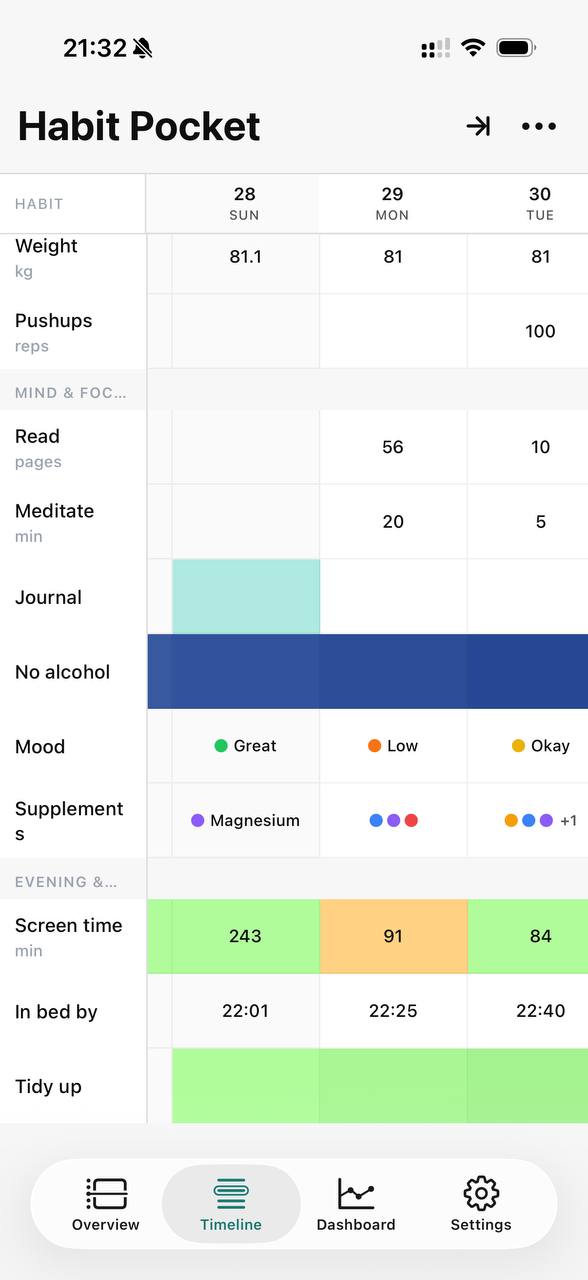
The real app on iPhone — numbers, times, moods, and checkmarks, side by side.
The questions a checkmark can't answer.
Most trackers only know if you did a thing. Habit Pocket logs the numbers and times around it too, so the pattern behind the question shows itself.
Why am I dead by 3 p.m.?
Log your bedtime, hours slept, and an afternoon energy score. The grid lines the flat afternoons up against the late nights, so you stop blaming lunch.
Where do my days vanish?
Track deep-work hours, phone pickups, and whether you shipped. One look shows which days got eaten — and by what.
What actually lifts my mood?
A daily mood score next to the things you suspect move it — a workout, daylight, people, caffeine. Let the pattern pick the lever instead of your guesses.
Am I progressing or just busy?
Put your top set beside sleep and soreness. See whether you’re actually getting stronger or just clocking sessions.
Not just checkmarks,
the whole picture.
Four ways to log
A check, a number, a time of day, or a pick from a list you define. Every habit fits in one grid.
Streaks that forgive
A rest day pauses your streak instead of breaking it. Colors deepen as the days add up.
Charts that connect the dots
Overlay sleep against mood, or steps against energy, and see what moves together.
Apple Health auto-fill
Steps, weight, and more arrive on their own on iOS. Less typing, same picture.
Ask AI about your data
Connect Claude or ChatGPT and ask what changed, in plain words. Built on MCP.
Private by default
Your habits are never shared and never sold. What you track stays yours.
See what moves together.
Because the grid holds numbers and times, not just checkmarks, you can lay sleep over mood over caffeine on one chart. Patterns you only suspected become lines you can point at.
Every habit gets a free stats page on the web. Pro adds the candle chart and charts that overlay your own picks.
Weight, steps & calories — last 56 days
Hover any day to read the exact numbers
Your data speaks. Literally.
Connect Claude or ChatGPT to your grid over MCP and ask in plain words — what changed, what helps, what to log. The tools you see running are real.

Your AI assistant
connected to Habit Pocket
Every feature, in one place.
The whole surface area of the app, so you know exactly what you're signing up for.
Four ways to log a day
A checkmark, a number with its unit, a real time of day, or a pick from a list you define. Every habit lives in the same grid, so the whole day reads in one pass.
Skips don't break streaks
Camping trip, head cold, planned rest day — mark it a skip and the streak passes straight through.
Goals decide the streak
At least, exactly, or at most. Log a day that falls short and the streak resets — a skip would have been the kinder call.
Two views, one dataset
The same habits and the same days, transposed. Switch from the top of the app whenever the other way round reads better.
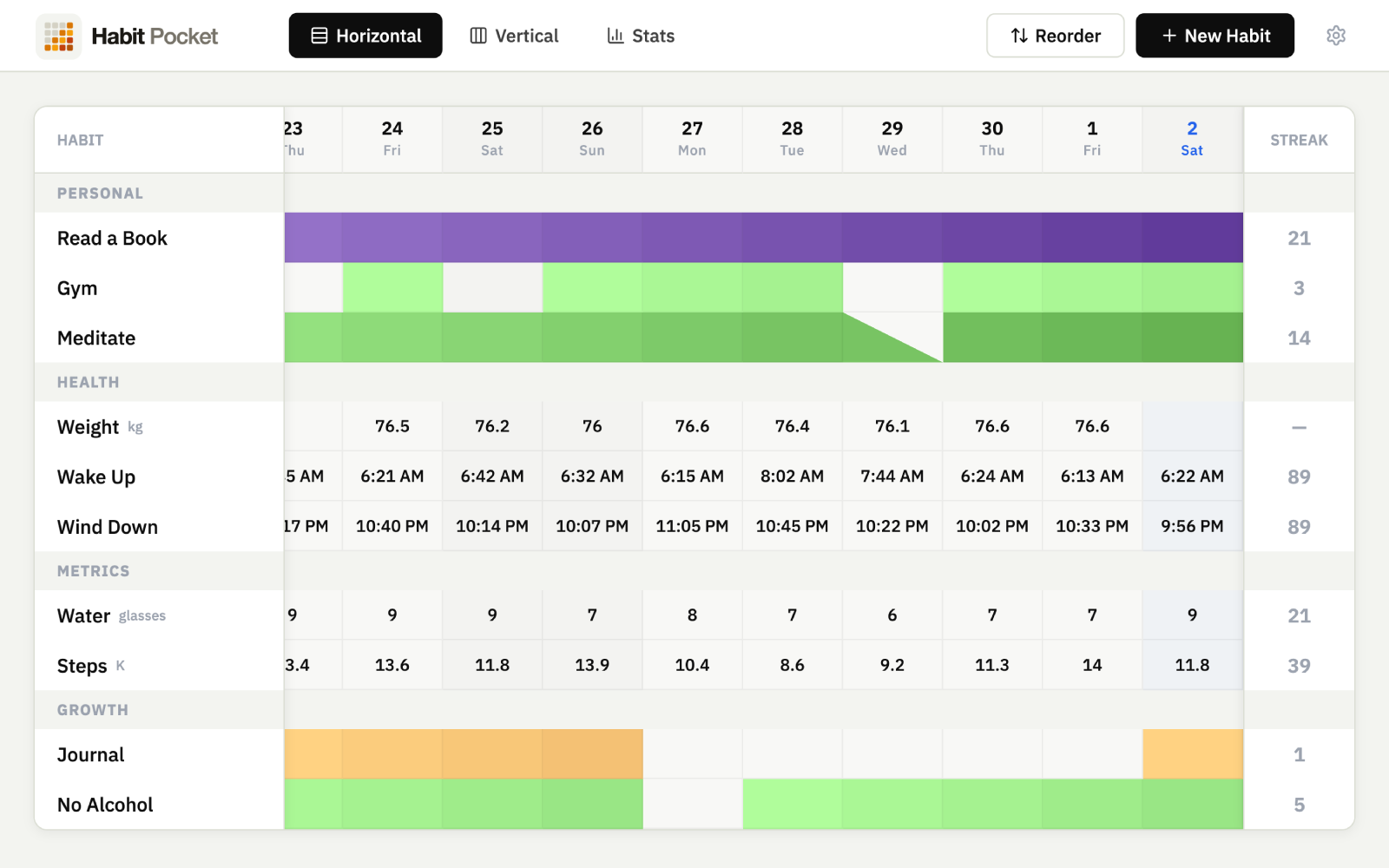
TimelineHabits down, days across. 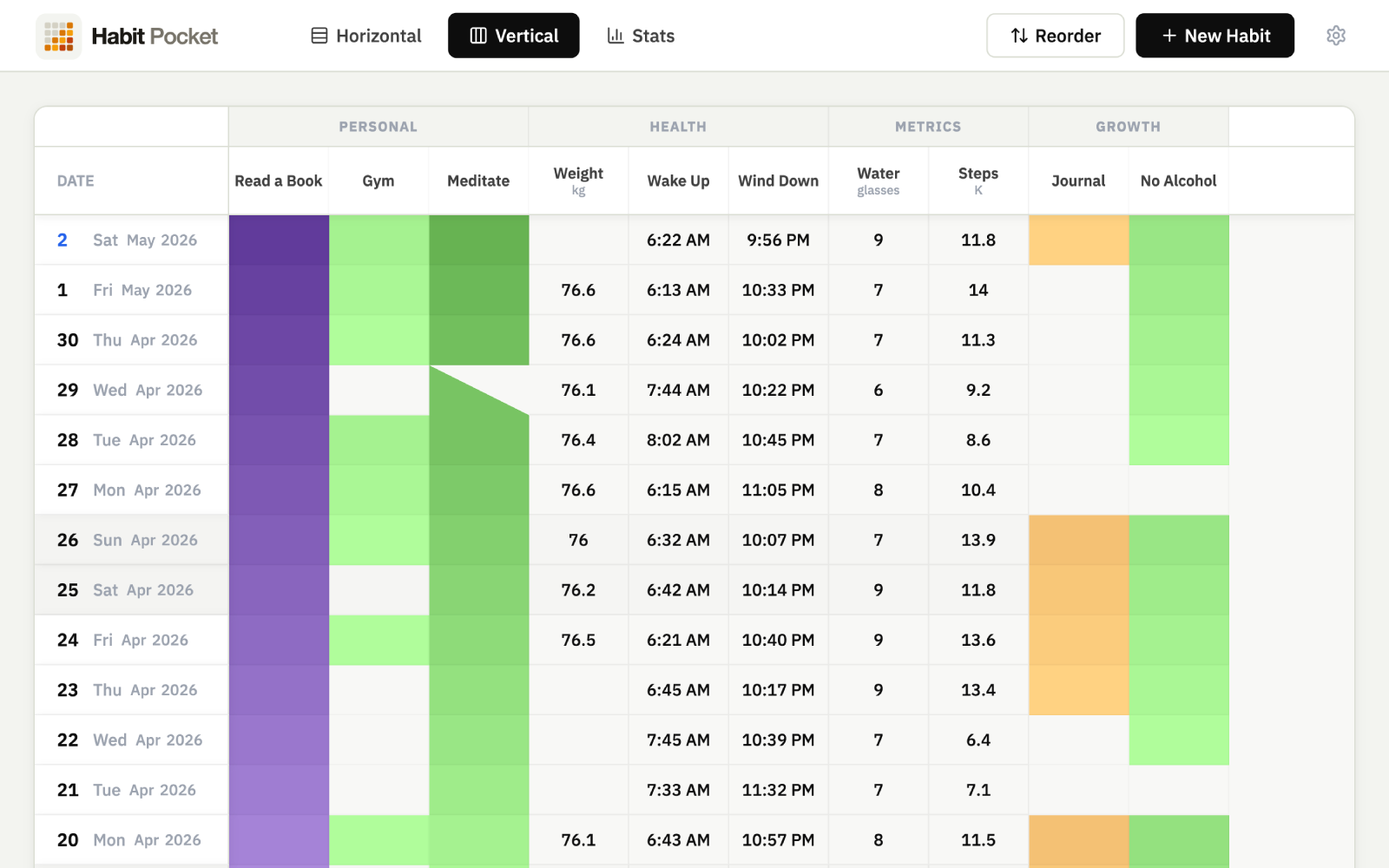
OverviewDays down, habits across. Charts you build yourself
Line, heatmap, summary, the candle chart and more. Pick the habits, the window, and the colors.
Numbers that color themselves
Set the bands once and every value paints its own cell. A slow week in your step count shows up before you've read a single number.
A page for every habit
Click a habit and its stats are already there: the streak, the rate, months of days and the charts that fit it. The Dashboard keeps only what you add. On the web app.
See habit stats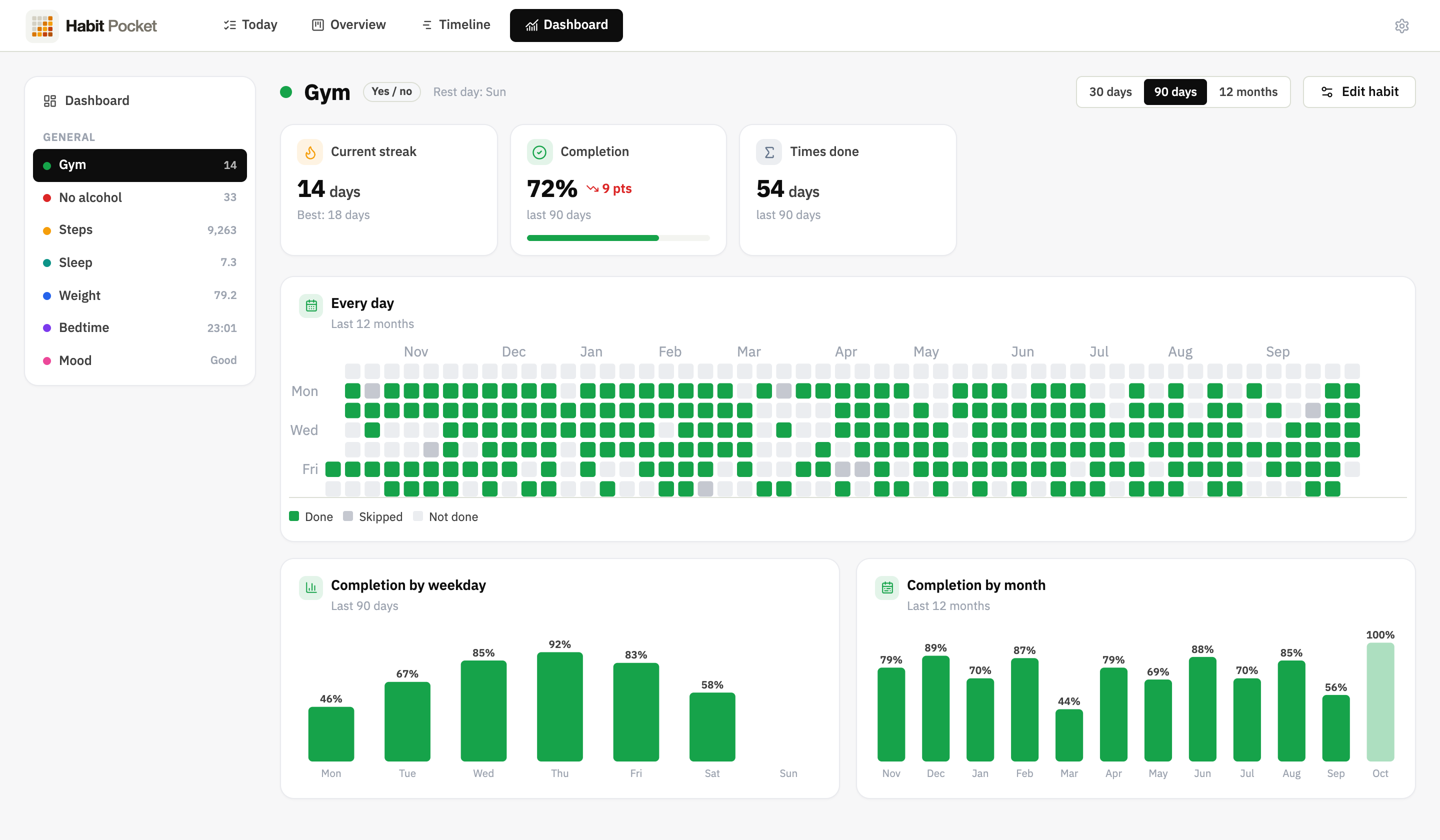
Ask AI about your grid
Connect Claude or ChatGPT over MCP. Fifteen tools that read your history and write back to it.
A real public API
REST at /api/v1 with a key you generate yourself. Habits, entries, stats, layout, charts.
Private by default
Your habits are never sold and never shared. The iOS app carries no ads and no tracking pixels.
On your phone, offline
The iPhone app keeps its own copy of everything, so a tunnel or a plane changes nothing. Apple Health fills in steps and weight on its own, and every plan syncs across iOS and the web.


- Sections & drag-reorder
- Exclude any weekday per habit
- Archive & restore
- CSV + JSON export
- Keyboard shortcuts on web
- Dark mode on iOS
- Streak gradients
- Week start & 12/24h
- Sign in with Google or Apple
Simple pricing, no traps.
Free
$0forever
Free forever, no card needed. Enough to find out if the grid fits how you think.
- Up to 5 habits
- Yes/no & numeric habit types
- A stats page for every habit (web)
- Last 60 days of stats
- Multi-device sync
Pro
popular$29.99/year
7 days free, then $29.99/year — 37% less than paying monthly. Cancel anytime before.- Unlimited habits
- AI access — connect Claude or ChatGPT to your habits (MCP)
- Apple Health auto-fill — steps, weight & more (iOS)
- Time-of-day & select habit types
- Numeric and time targets
- Every chart type, including the candle chart
Every plan syncs across iOS and the web. Your data exports any time.
Prices in USD. Your local currency is shown at checkout.
FAQ
Common questions
Not yet. iOS is live on the App Store, and Android is next on the same offline-first engine. If you're on Android in the meantime, the web app works in mobile browsers and Chrome will let you install it to your home screen.
Five habits with the yes/no and numeric types, a stats page for every habit on the web, the last 60 days of stats, and unlimited sync across iOS and the web. No credit card to sign up.
Four types, mixed in one grid: a yes/no check, a number with a unit and target (steps, water, weight), a time of day (a 07:15 wake-up stored as a real time, not a number), and a select list you define (mood, energy, workout type) with color-coded options and single or multiple choice. Yes/no and numeric are free; time-of-day and select are Pro.
They're on the roadmap, coming soon. When they land they'll be opt-in and quiet — Habit Pocket is for tracking, not for guilt-tripping you into opening it. Until then, a calendar event works if you want a nudge.
A blank day breaks the streak. A skip (the diagonal half-fill cell) pauses it instead, which is useful for rest days or anything you've decided to take off. Excluded weekdays don't count either way.
Yes. Export your full history as CSV or JSON any time, free on every tier — you own your data. Deleting your account wipes everything from the database in one click, immediately: no soft-delete, no waiting period, no support ticket.
Yes. The Lifetime plan is a single payment that unlocks every Pro feature for good, with no recurring charge. If you'd rather not commit, the monthly and yearly plans unlock the exact same features and you can cancel any time.
If you're on the monthly or yearly plan, it's one click in the in-app billing portal — you keep Pro until the end of the period you've already paid for, then drop to Free with every habit and entry intact. The Lifetime plan never renews, so there's nothing to cancel.
Everything keeps working on mobile. Your phone holds the data and syncs the moment you reconnect. If two devices edit the same cell while offline, last-write-wins resolves it on next sync.
Five habits. Thirty days.
See what shows up.
No credit card. Pick five habits. Come back in a month.