
Features
Everything in Habit Pocket. Plainly.
The landing page is the short version. This is the full list, in the order you would meet each piece if you signed up today. No marketing words for things that don't exist yet.
01 · The grid
Your home screen, on every device.
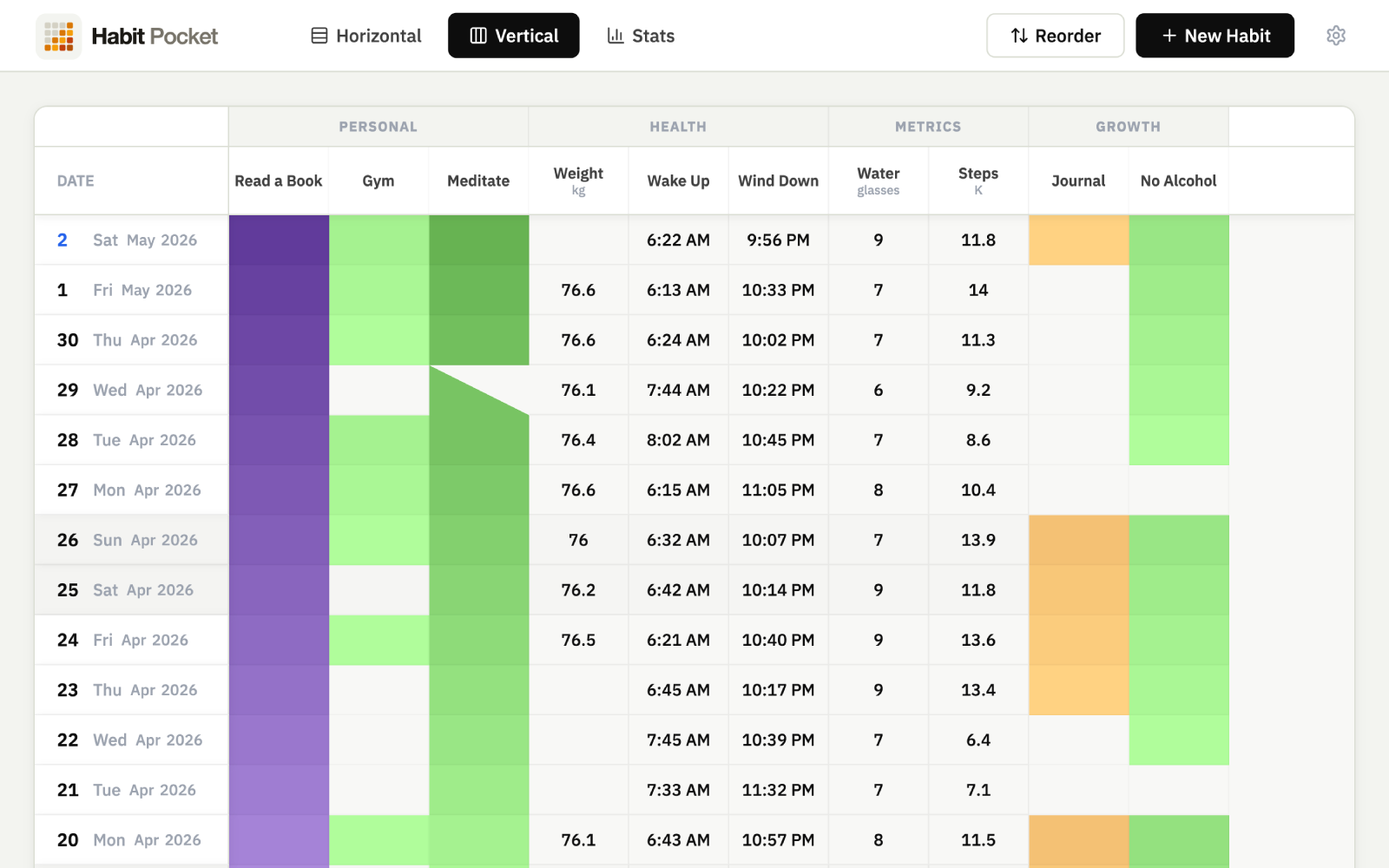
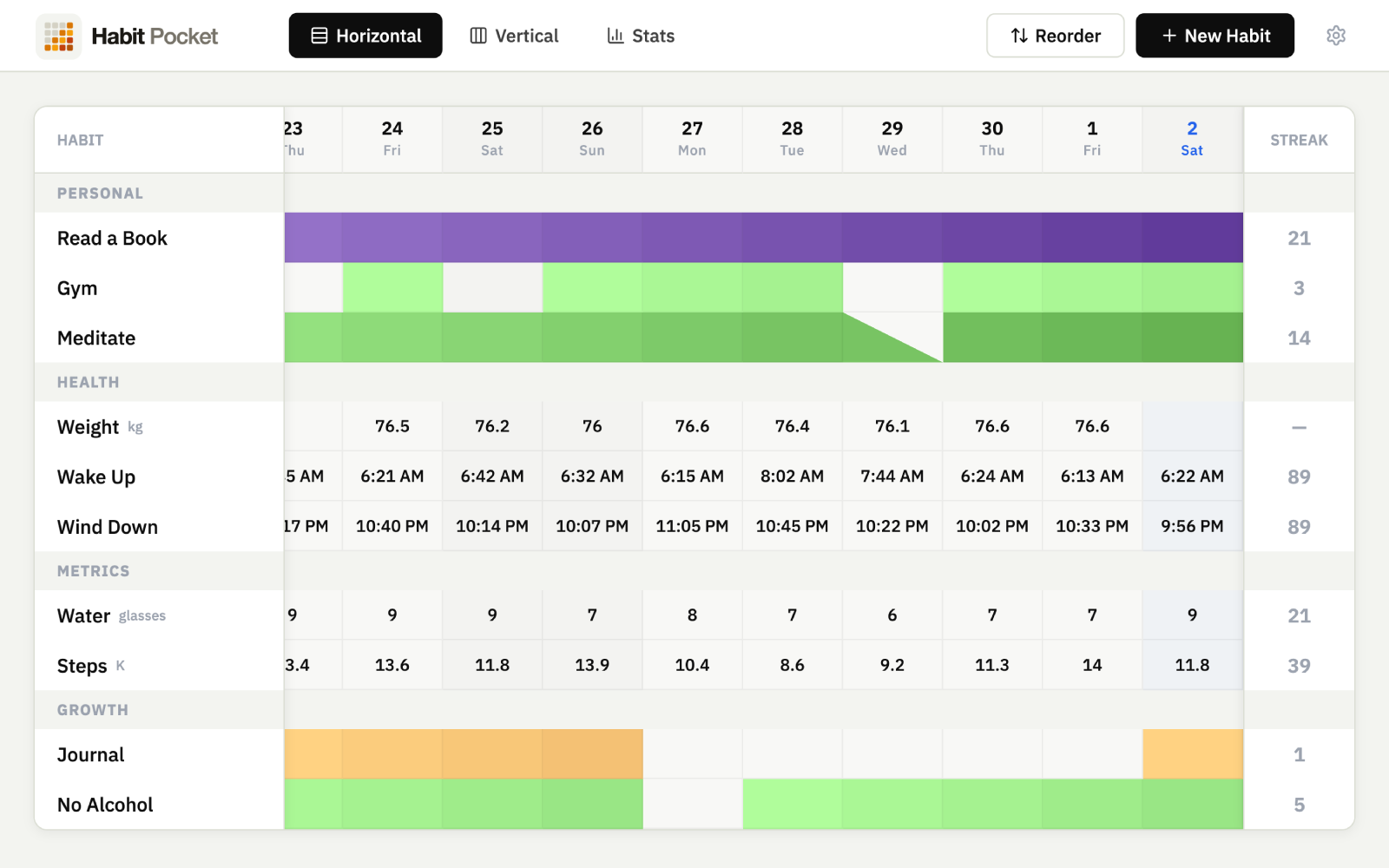
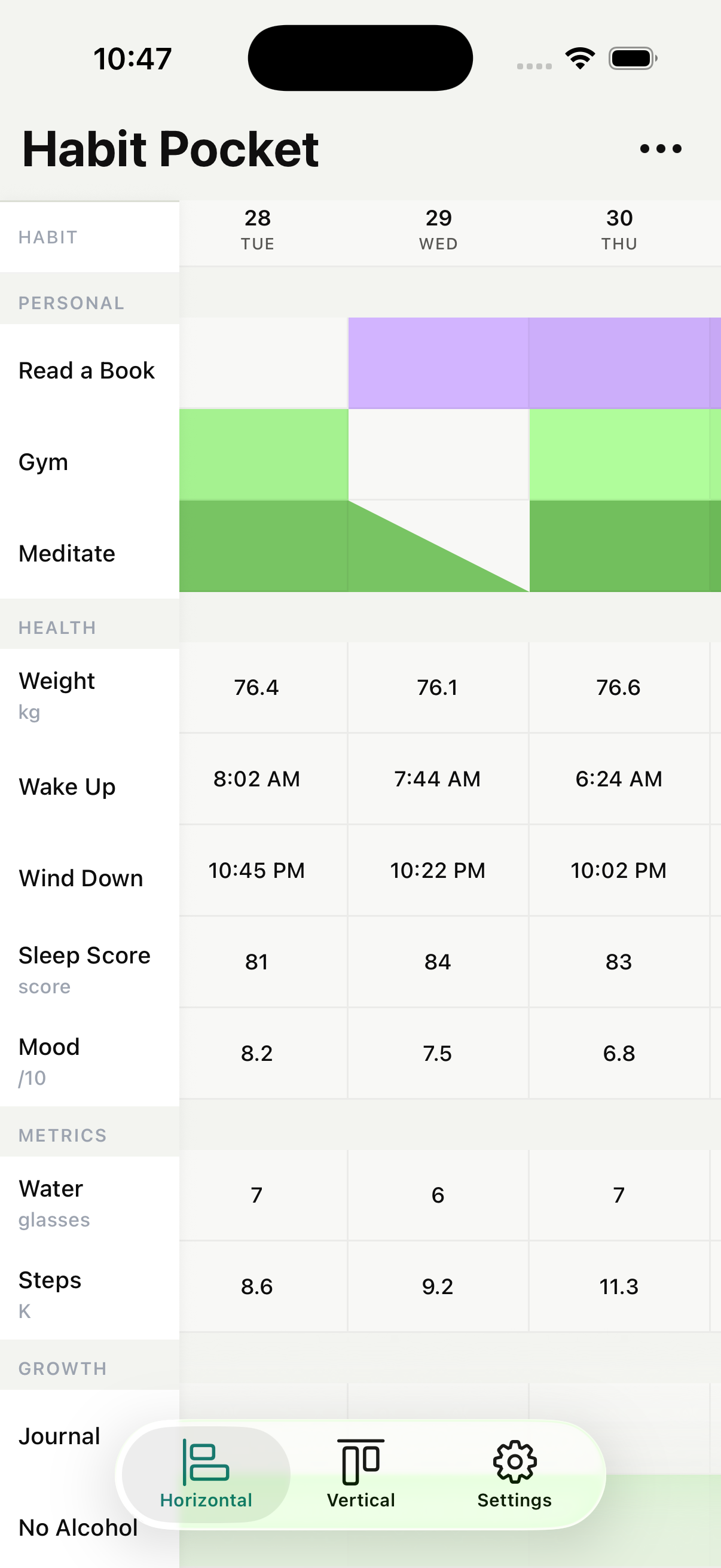
Rows and columns. Habits across one axis, days across the other. Click a cell to log. Streak colors deepen as the days add up. Two layouts: vertical (habits as rows) for tablets and wider screens, horizontal (days as rows) as the mobile default. Switch any time from the topbar.
Use cases
- Vertical grid for a laptop or tablet: habits as rows, dates marching left-to-right.
- Horizontal grid for a phone: today at the top, scroll down through history.
- Blank cell = missed day. Diagonal half-fill = skip (pauses the streak instead of breaking it).
- Excluded weekdays don’t count either way, so "Pilates, weekdays only" doesn’t ding you on Saturday.
Best for seeing all your habits at once, the way a calendar shows all your days at once.
02 · Four habit types
Check, count, clock, or pick.
Most trackers give you one type: a checkbox. Habit Pocket gives you four, because 'did I do it?' is not the same as 'how much?', 'when?', or 'which one?'. Time-of-day records 07:15 as a real time, not a number you have to translate. Select lets you pick from a list you define, like a mood or a workout type, color-coded, one choice or several.
Use cases
- Yes / No — one click. Meditate, read, take medication.
- Numeric — a number with an optional unit and target. 5,000 steps, 8 glasses, 76.4 kg.
- Time-of-day — an actual time, with a target time. Wake at 07:15, wind down at 22:30.
- Select — pick from a list you define, color-coded, one choice or several. Mood, energy, workout type.
- Per habit you can set color, description, unit, section, excluded weekdays, daily target, and time target.
Best for anyone who has ever tried to track sleep onset, weight, wake time, or mood and felt the checkbox was the wrong tool.
03 · Charts
Four chart types, and the one nobody else has.
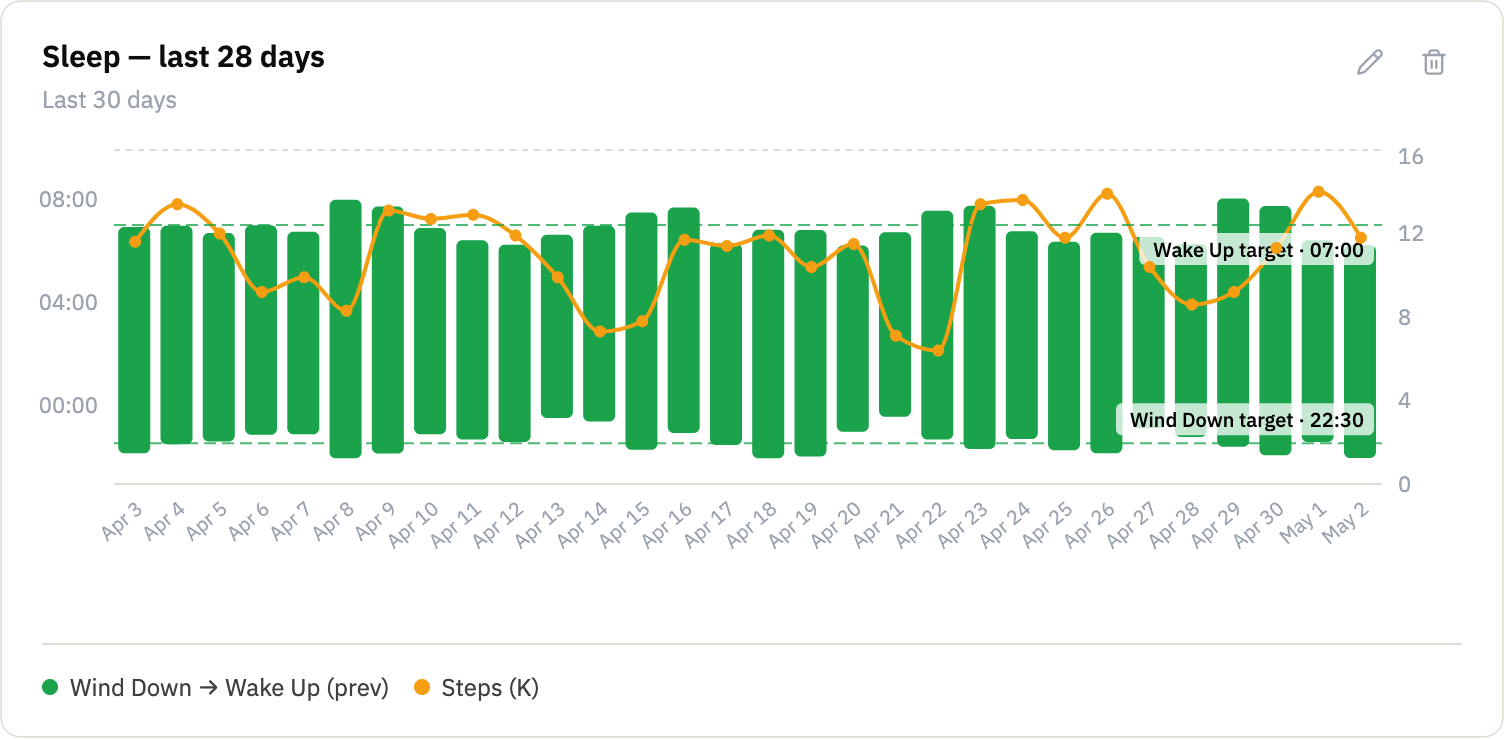
Line, heatmap, summary card, and the candle chart. Free users get one auto-generated chart per habit, capped to the last 60 days. Pro unlocks the custom chart builder: pick the type, the metric, the range, an overlay metric if you want one, and save the result to your dashboard. The candle chart is the one we haven't seen in any other tracker.
Use cases
- Line — trends and correlations. Stack two metrics to look for patterns.
- Heatmap — one square per day for yes/no habits. Color depth grows with the streak.
- Summary — a stat card. Latest value, change since last time, period average.
- Candle — paired times on one axis with an optional numeric overlay. The differentiator.
- Ranges: 30d, 60d, 90d, 180d, 365d, year-to-date. Free is capped at 60d; Pro unlocks the rest.
Best for turning a grid into a story. For the type-by-type guide on when to pick each chart, see the deep page below.
More on each chart type: Read the full guide to habit charts.
04 · Sync that’s free
One database, every device, no Pro gate.
Real-time across iOS and the web. Mark a habit on your phone, see it on your laptop before you set the phone down. Offline-first on mobile, so your phone holds the data locally and pushes the moment it reconnects. Last-write-wins with a device-id tiebreaker. No conflict modals, no sync paywall, ever. Sync is hygiene, not a feature.
Use cases
- Cross-device users who live on a laptop most of the day and a phone the rest.
- Anyone who has lost an entry to a flaky sync layer in another tracker.
- Trips with no signal. Log in the woods, sync when you’re back.
- People who refuse to pay extra for what should already work.
Best for anyone who wants the answer to 'is this on my other device yet?' to always be yes.
05 · Apple Health
The habits your phone already tracks for you.
On iPhone, a numeric habit can connect to Apple Health and fill itself in every day. Steps and weight are easy to log for a fortnight and impossible to log for a year, and this is what makes the long record exist at all. Pro, and iPhone only.
Read-only, always
Habit Pocket asks Health for read access and never for write access, so nothing it does can change what your watch, scale or food app put there.
One metric at a time
Permission is asked for the moment you pick a metric, not in one sweeping request up front. Connect steps without handing over your heart rate.
Your edits win
Auto-fill may only create a missing entry or replace one it wrote itself. A value you typed is never overwritten by a later refresh.
A rolling 30 days
Every refresh re-reads the last 30 days, which quietly fixes days you never opened the app and watch data that synced late.
Sleep is the one people ask for most and it is not supported yet, so wake-up and bedtime are still typed in by hand. There is also no direct Whoop, Garmin or Oura integration: if your device writes into Apple Health, this reads it, and if it does not, this will not see it. All 15 metrics, and how each one is used.
06 · Organization & daily life
The small things you only notice once they’re missing.
The grid stays clean because these knobs handle the edge cases for you.
Sections
Group habits under headings like Health, Sleep, Growth. Reorder sections in the reorder screen, and drag habits between them.
Excluded weekdays
Set per habit. Pilates on weekdays only, journaling on Sundays only. Excluded days don’t count as misses or breaks.
Skips, not misses
Mark a day as a skip and the streak pauses instead of resetting. The cell shows a diagonal half-fill so the history stays honest.
Archive & restore
Done with a habit? Archive it. The history stays, the daily view stays clean, and you can restore at any time.
Hand-ordered habits
Inside a section, habits are sorted by hand. No alphabetical surprises, no automatic re-rank when you log.
Per-habit color and description
Pick a color for the streak fill, write a one-line description so future-you remembers why this habit is on the list.
07 · Accounts & data
Your account, your data, your call.
Plain authentication. Plain settings. Plain export. Plain delete.
Sign in your way
Email and password, Google OAuth, or Sign in with Apple on mobile (web rollout in progress). Reset flow built in.
Sensible session lengths
7-day sessions by default, 60 days if you tick "Remember me." Mobile tokens live in the system keychain.
Timezone & week-start
Picked up automatically on sign-up. Override either one from settings. Week starts on Monday or Sunday, your call.
12-hour or 24-hour time
The time-of-day type and the candle chart both follow your format preference. No mixing on the same screen.
Dark mode
Live on mobile today, coming to web later. Matches your system setting by default.
CSV export
One click from settings, gets you every habit and every entry. JSON export including chart configs is on the roadmap.
Account deletion
One click wipes refresh tokens and erases user-owned data in a single transaction. No 30-day soft-delete purgatory.
No ads, no tracking pixels
Sentry for crash diagnostics, the standard auth provider analytics, nothing else. Read the full statement on the privacy page.
08 · What Habit Pocket won’t do
The absences are the product, too.
Habit Pocket has decided to be small in three specific ways. These are positions, not roadmap delays.
No nagging
A daily nag drives short-term opens at the cost of long-term trust. Push reminders are on the roadmap, but they'll be opt-in and quiet, never a guilt-trip. Until then, a calendar event will outlast any habit app.
No gamification
No XP, no points, no levels, no party quests, no avatars, no unlockable cosmetics. The reward for tracking a habit is seeing the data accumulate.
No social layer
No feed, no friends list, no leaderboards. If you want accountability, share the link to a chart with one specific person.
Five habits. Thirty days.
See what shows up.
No credit card. Pick five habits. Come back in a month.