
Use case · Numeric habits
A habit tracker that tracks numbers, not just yes/no.
Yes, Habit Pocket tracks numbers: you log 5,000 steps, 8 glasses of water or 76.4 kg, each with its own unit and an optional daily target. Habit Pocket is a habit tracker that logs numbers, times of day and moods side by side, so you can see what your habits do to your sleep, mood and energy. Numbers and yes/no checks are free on iOS and the web; a daily target is Pro. Most trackers give you only a checkbox, but "did I do it?" and "how much?" are different questions.
5 habits free, forever. No credit card. Your data stays private.
Proof
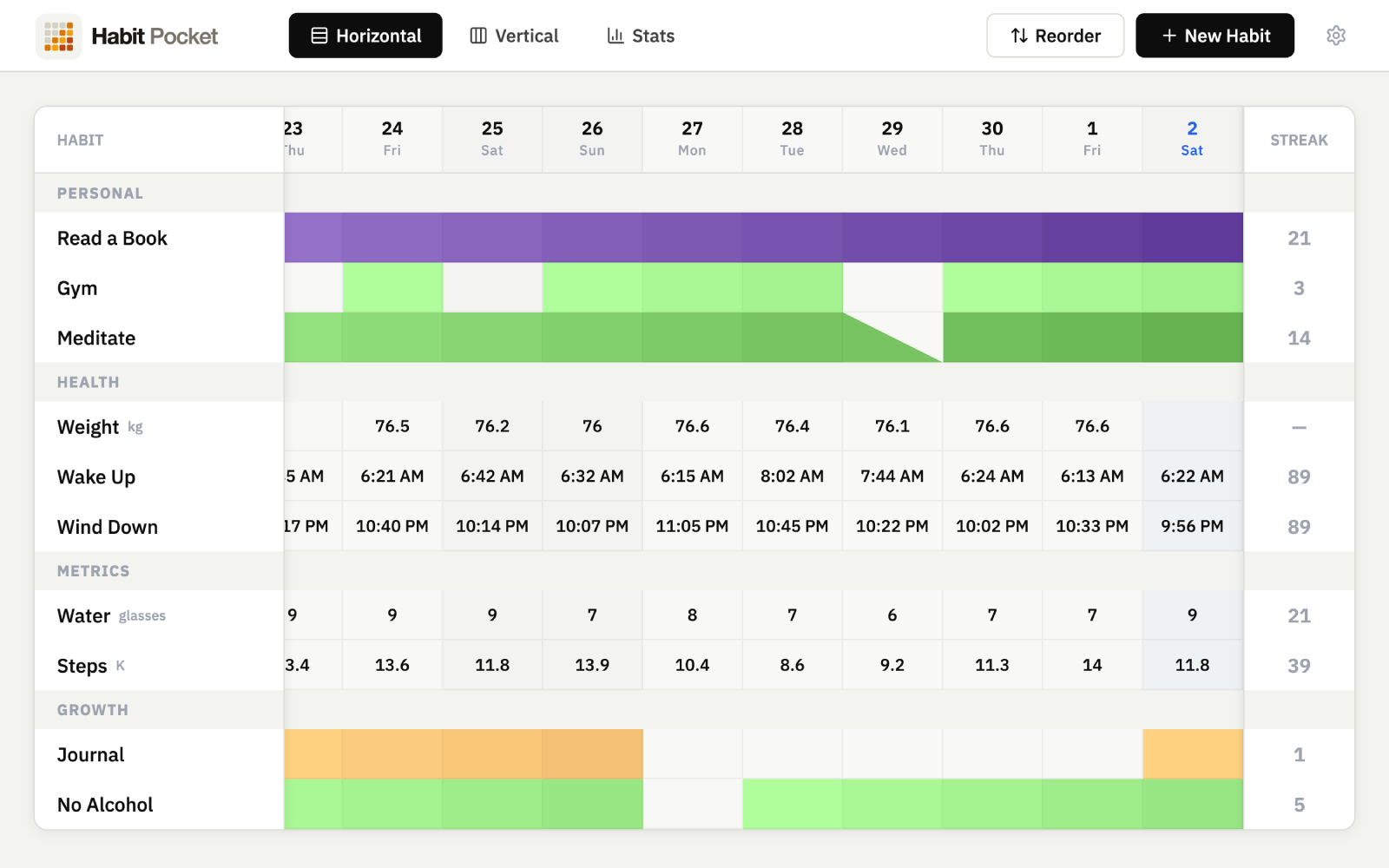
Numbers live in the grid, next to the checks.
Steps, water, weight, each with a unit and an optional target, in the same view as your yes/no habits. Click a cell, type a number.
Proof
Every number gets a chart.
A numeric habit is not just a log. It is a line you can read — the latest value, the change since last time, and the trend over the range.
Steps
Water
Weight
Four habit types
Check, count, clock, or pick.
The numeric type is one of four. Yes/No is one click. Numeric is a number with a unit and target. Time-of-day is an actual time, like a 07:15 wake-up. Select is a pick from a list you define, like a mood. Pick the right tool per habit instead of forcing everything into a checkbox.
Use cases
- Steps, glasses of water, kilometres, pages, calories — any count with a unit.
- Weight or body measurements, with the trend charted automatically.
- A daily target per habit, so a cell reads 9,540 against a goal of 8,000.
- Mix numeric, yes/no, and time-of-day habits in the same grid and the same charts.
Best for anyone who has tried to track steps, weight, or water and felt a checkbox was the wrong tool.
Keep reading
- Looking for the Apple Numbers template? Get it here →
- See how two numbers correlate (steps vs weight) →
- Track wake-up and bedtime as real times →
- Coming from a tracking spreadsheet? →
- Habit Pocket vs Exist, the numbers dashboard →
- Doing 75 Hard? Track it with real numbers →
- Let Apple Health fill the numbers in →
FAQ
Numeric tracking — common questions
Yes. Each numeric habit carries its own unit (steps, glasses, kg, minutes, anything) and an optional daily target, so a cell can read "9,540 steps" against a goal of 8,000.
Every numeric habit gets its own stats page, and on Pro a line chart of its values that you can overlay on another habit to compare. Free includes the stat cards and heatmap for every habit; Pro adds line charts and longer ranges.
Yes. The numeric type is in the free plan, alongside yes/no, for up to 5 habits with no credit card. The time-of-day type and the candle chart are the Pro additions.
That is a different page — this one is about tracking numeric habits in the Habit Pocket app. The free spreadsheet template (the original Apple Numbers file the app grew out of) lives at habitpocket.io/habit-tracker-template-apple-numbers/, with Excel and Google Sheets versions too — also the first link under "Keep reading" on this page.
Five habits. Thirty days.
See what shows up.
No credit card. Pick five habits. Come back in a month.