
Seasonal · New Year
New Year Habit Tracker 2027 — track resolutions as numbers, not just checkmarks
To use Habit Pocket as a New Year’s resolution tracker, turn each resolution into one thing you can log every day: a number (10,000 steps, 20 pages), a clock time (in bed by 23:00) or a plain yes/no. The number is the point. On a hard day, 6,000 steps is saved as 6,000, where a checkbox would leave a blank. If you know you’ll miss a day, mark it as a skip and the streak pauses instead of breaking. Five habits are free on iPhone and the web. Daily goals and time-of-day habits are Pro.
5 habits free, forever. No credit card. Your data stays private.
Checks, numbers and times in one grid. An example, not real data. Yes/no habits sit next to steps, a wake-up time and hours of sleep, so a resolution that’s a number doesn’t need a separate app. No Alcohol is an avoid habit: a clean day fills in on its own, and the red × is a slip.
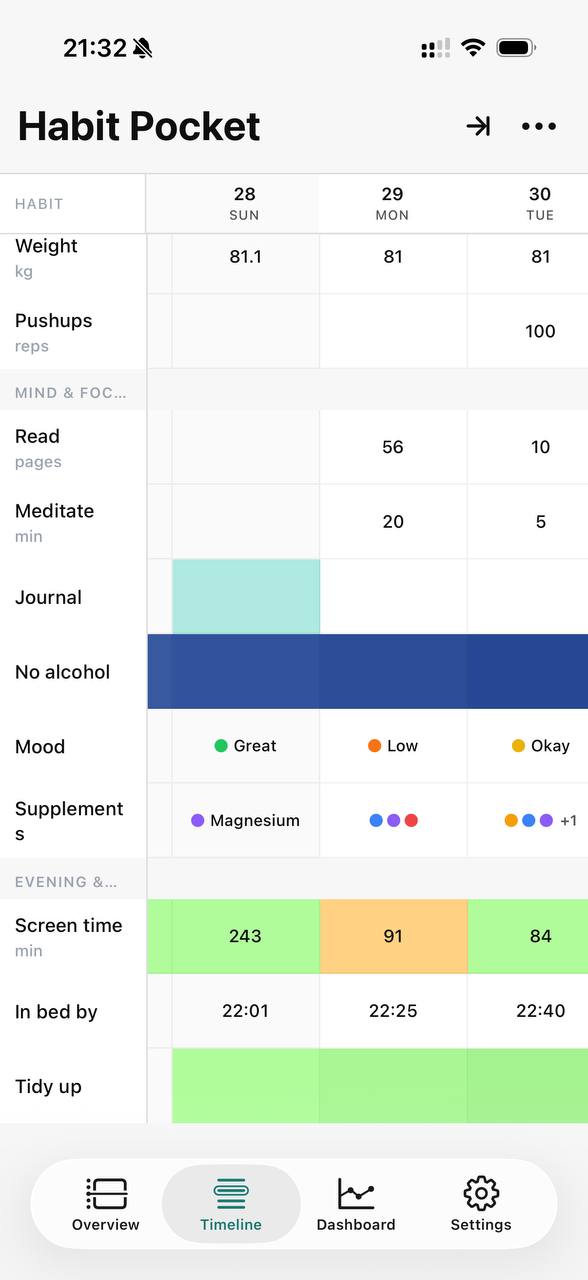
The real app on iPhone — numbers, times, moods, and checkmarks, side by side.
Last updated: October 2026
The problem
Why are most resolutions tracked wrong?
Because they’re tracked with a checkbox, and a checkbox only knows done or not done. It hides the progress you make and turns every hard day into a zero.
Take “walk 10,000 steps a day”. To a checkbox, 9,300 steps and 0 steps are the same miss. So you either round 9,300 up and tick it, or leave it blank and lose the streak. Both are wrong. Rounding up teaches you to move the line, and leaving it blank says a good effort on a bad day counted for nothing.
“Read more” and “sleep earlier” have the same problem. Twelve pages isn’t zero pages. Getting into bed at 23:20 after a month of 01:00 is a big change, and a checkbox for “in bed by 23:00” still records it as a fail. By February the blanks hide a trend that was going the right way.
The fix is to store the value. I wrote about my nightly argument with a checkbox, and what changed when I stopped having it, in set a minimum, not a goal.
The method
How do you turn a resolution into a number or a time?
Ask what you’d write down at the end of the day if nobody were judging. That value is the habit: a count, a clock time or a plain yes/no. The resolution is just the direction you want it to move.
| Resolution | In the grid | What you log | Type | Plan |
|---|---|---|---|---|
| Sleep earlier | 22:48 | The time you got into bed, goal “before 23:00” | Time of day | Pro |
| Walk more | 10,412 | Steps, goal “at least 10,000” | Numeric | Free to log, goal is Pro |
| Read more | 24 | Pages read, goal “at least 20” | Numeric | Free to log, goal is Pro |
| Exercise | Minutes trained, or a check on set weekdays | Numeric or Yes/No | Free | |
| Drink less | × | Something to avoid: tap only on a day you drink | Yes/No (avoid) | Free |
| Feel better | Good | Mood or energy from a list you define | Select | Pro |
“Sleep by 23:00” is a time, not a checkbox.
Habit Pocket stores a bedtime as a real clock time. 23:40 is saved as 23:40, and you can chart it across the month. Give the habit a “before 23:00” goal and any night past 23:00 breaks the streak, while a night at 23:00 or earlier extends it. Time-of-day habits are Pro.
“10k steps” and “read 20 pages” are numbers with a floor.
Numeric habits are free. Log 6,240 steps or 14 pages and the grid keeps the exact number. With no goal, any day you log more than zero counts toward the streak. A daily goal is Pro. You pick at least, exactly or at most, on the iPhone or the web, and a day under “at least 20 pages” breaks the run like a blank. There’s more in the habit tracker for numbers guide.
Some resolutions really are yes or no.
“No alcohol in January” works best as something to avoid. An empty day counts as clean. You tap only on a day you drink, and that tap ends the run. Yes/no and avoid habits are both free.
Starter template
A 4-week starter template for your resolutions.
Here are four weeks, numbered by day so you can start on January 1 or any day after. Four weeks usually won’t make a habit automatic (the study further down puts the median at 66 days), but it’s long enough to tell whether a resolution is the right size.
- 1
Days 1–7
Log the number, no goal yet
Pick three resolutions at most and log what actually happened each day. This week is your baseline, so a low number is just where you’re starting.
128205149Example: pages read, no goal
- 2
Days 8–14
Set a floor
Pick the number you’d still hit on your worst day. That’s the goal, not the number you hope for. On Pro it becomes an “at least” or “before” goal, and the streak checks it.
1214811151013Floor: at least 10 pages
- 3
Days 15–21
Plan the skips
Mark travel, illness and rest days as skips, not blanks. If a habit isn’t daily, exclude the weekdays it doesn’t apply to, so a Monday–Wednesday–Friday gym habit isn’t missed on a Tuesday.
1215111416Two planned skips, no break
- 4
Days 22–28
Read the four weeks
Open each habit’s chart and keep what’s moving. If you missed a floor most days, lower it. Drop anything you’ve stopped caring about, and only add a habit once the first three feel easy.
All 28 days on one chart
All of this fits the free plan if you stay at five habits or fewer and log numbers without goals. Free stats cover the last 60 days, so all four weeks show on each habit’s chart. Reminders aren’t in the app yet, though they’re on the roadmap. Until they ship, a repeating calendar event at the time you usually log does the job.
No app? Use my free habit tracker template for Excel, Google Sheets and Apple Numbers. The download needs no email. It has one row per day and one column per habit, and a second sheet holds numbers and wake and bed times. The four weeks work there too: a gray cell is a skip, and in week four you scan the columns instead of opening a chart.
When life gets in the way
Skips don’t break streaks.
In Habit Pocket a skip pauses the streak instead of breaking it. It’s a third state, shown as a diagonal half-filled cell, so one planned day off doesn’t reset your January to zero.
- 🏕️Camping — 2 days— skip, streak holds
- 🤒Down with a cold— skip, streak holds
- ✈️Travelling— skip, streak holds
- 😴Rest day— skip, streak holds
A blank cell is still a miss, and it still breaks the run. A skip is for a day you planned to miss, like a flight, a cold or a rest day. On that day the streak neither grows nor resets, and it picks up again the next day you log. The Dashboard lists each habit’s current and best streak.
There’s research behind this. In a 2010 study of how habits form in daily life, Phillippa Lally and colleagues at UCL found that automaticity took a median of 66 days to level off, anywhere from 18 to 254 days. They also found that missing one opportunity didn’t materially affect the process (Lally et al., 2010). A tracker that sends you back to zero after one missed day is treating a small thing as a big one.
The exception is a strict challenge, where you may not want skips at all. The 75 Hard tracker guide shows that setup: miss any task and you’re back to day 1.
FAQ
New Year habit tracker — common questions
Turn it into one thing you can log every day, and log the real value rather than done or not done. “Read more” becomes pages read. “Sleep earlier” becomes the time you got into bed, and “move more” becomes steps. A checkbox throws progress away and a number keeps it, so 12 pages on a busy day is saved as 12, not as a miss. Start with three resolutions at most, and give them four weeks before you add more.
Yes, for up to five habits, and no credit card. Free covers yes/no habits (avoid habits like “no alcohol” included), numeric habits such as steps or pages, one automatic chart per habit and the last 60 days of stats. A four-week start fits inside that. Daily goals, time-of-day habits such as a bedtime, pick-from-a-list habits such as mood, and more than five habits are Pro, at $3.99 a month or $29.99 a year. Monthly and yearly both start with 7 days free; cancel anytime before.
That depends on how you mark it. A blank cell is a miss, and a miss breaks the streak. A skip, the diagonal half-filled cell, pauses it: the run doesn’t grow or reset, and it carries on the next day you log. Use a skip for a day you planned to miss, like travel, illness or a rest day. On a habit with a daily goal, a day that misses the goal breaks the run too.
Not yet. Push reminders are on the roadmap, and they’ll be opt-in and quiet when they ship, but they aren’t in the app today. Until then, a repeating calendar event at the time you usually log does the job. If a reminder on your phone matters more to you than numbers and charts, pick an app that has reminders now.
Not as an app yet. Habit Pocket runs on iPhone (from the App Store) and as a full web app at app.habitpocket.io that syncs with it. An Android app is planned, but there’s no date. On an Android phone, use the web app in the browser.
Yes. The free habit tracker template works in Excel, Google Sheets and Apple Numbers, and you don’t have to give an email to get it. If you’d rather not install anything, it’s the right choice. It has one row per day and one column per habit, with a second sheet for numbers and wake and bed times, so the four-week plan on this page works in it too.
Five habits. Thirty days.
See what shows up.
No credit card. Pick five habits. Come back in a month.