
Blog · Essay
My grid went all green and stopped telling me anything
Setting a floor killed the nightly argument about whether 9,300 counts, and then every day above the floor started looking exactly like every other one.
Bohdan Stefaniuk · · 4 min read
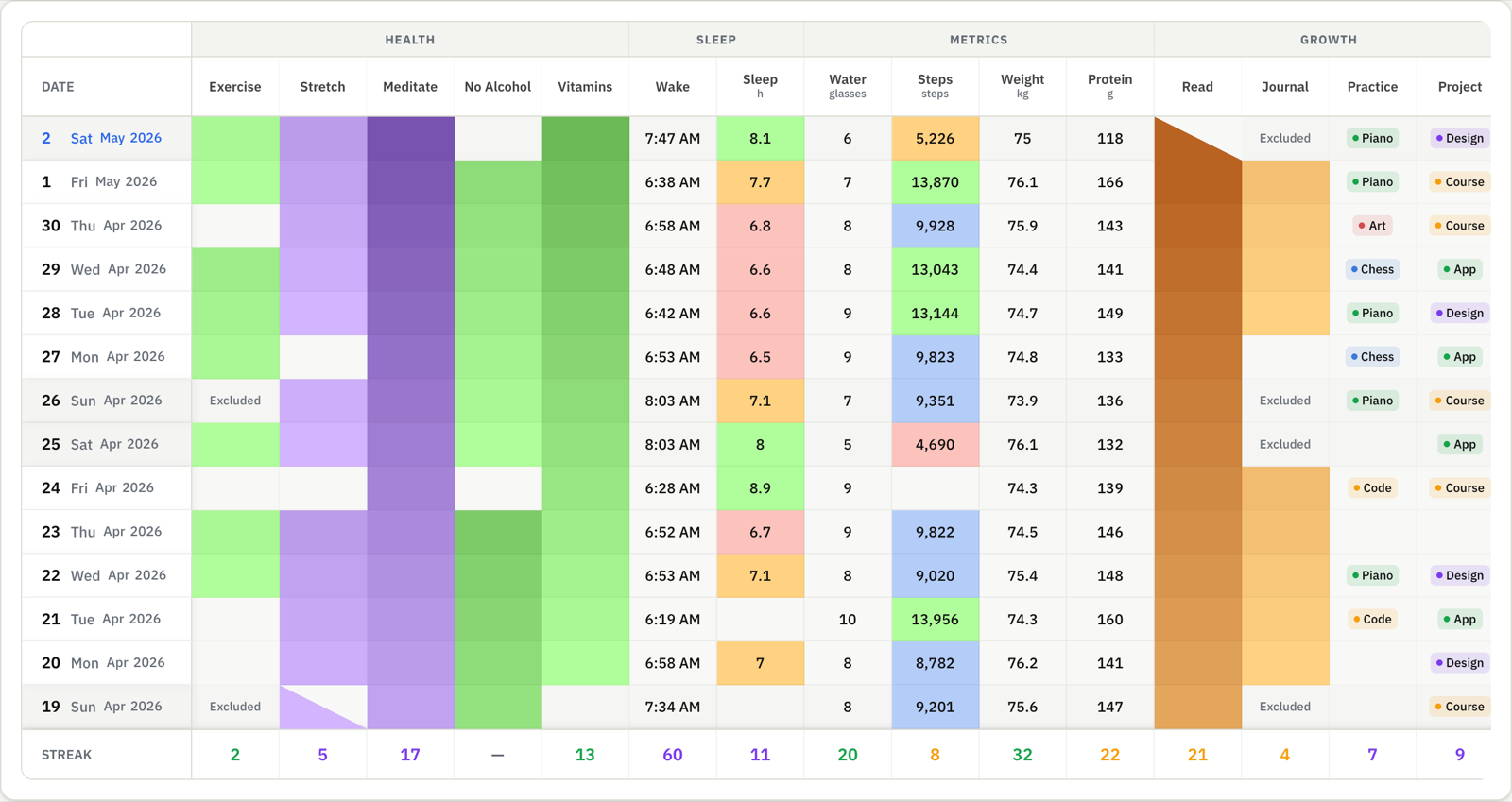
The floor worked. I wrote about it last month — I stopped storing steps as done or not done, set the habit to walk with a minimum of 3,000, and the eleven-o’clock negotiation with myself just stopped happening.
Then I looked at a month of it.
Thirty green squares. A 3,100-step day sitting next to a 14,000-step day in the same shade, because both of them cleared a bar I’d set deliberately low. My grid had decided that clearing the bar was the only fact worth showing me.
The numbers were all still in there. I’d have to click a cell to read one, and nobody clicks thirty cells.
A grid has two channels and one is already spent
Position is taken. Rows are habits, columns are days, and that arrangement is the entire point of a grid. Color is what’s left over. Most trackers spend it on attendance, so the cell tells you whether you remembered to log, which you already knew, because you’re the person who logged it.
A month of identical green squares proves I showed up. It says nothing about how I walked.
Bands, and the one thing that catches me out
What I use now is a list of color bands. A band is a color and an upper bound. They’re read top to bottom and the first one that matches wins, and the last band has no bound at all, so it catches everything above. My steps habit runs: under 5,000 red, 5,000 to 7,000 amber, 7,000 to 10,000 blue, 10,000 and up green.
The bound is exclusive, which is the part that catches me. If the first band is “under 5,000”, then a day of exactly 5,000 steps lands in the second band rather than the first. I’ve squinted at a boundary day more than once trying to work out why it wasn’t the color I expected.
Setting it up in Habit Pocket is per habit: open a number or a time habit, find the Styling section, switch on “Color days by their value”, then edit the rows and watch the preview strip while you do it. There are starter bands already filled in, so it does something reasonable before you touch anything. The full setup guide is here if you want the click-by-click version.
Green doesn’t mean good until you decide it does
This is the part I actually like. The colors carry no built-in meaning, so the direction is yours. Steps get green at the top. Screen time gets green at the bottom: under 30 minutes green, 30 to 60 blue, 60 to 120 amber, past 120 red. Same machinery, pointed the other way, and a red cell now means what it needs to mean on that particular row.
Times work the same way. My wake-up habit is green before 6:30, amber until 7:30, red after that. Bedtimes hold together across the midnight seam too, so 23:40 and 00:15 land in bands that make sense instead of at opposite ends of a number line.
Blank days stay blank
A day with no value matches no band, so it stays uncolored. A skip does the same. Nothing gets invented to fill the gap, which is the same principle as storing the number in the first place. The grid shows what happened, including the days when nothing did.
Where it stops
Numeric and time habits only. Yes/No habits get the streak gradient instead, where the color deepens as the run grows, and Select habits already carry a color per option. If everything you track is a checkbox, this feature has nothing for you, and I’d rather say that here than have you go looking for a toggle that isn’t there.
It paints the cell background. No icons, no bold text, no per-band labels, no second color for the number itself. There’s one comparison shape (value under bound, first match wins), so there’s no “equals” and nothing that compares one habit against another. The bands don’t sort themselves either, so you enter them in ascending order or you get nonsense. None of it touches your charts or your stats, and it doesn’t change a streak count. It’s paint.
The thing that surprised me is that bands are separate from the habit’s target. Setting a target of 10,000 steps doesn’t move your bands; you set the two things in two places. I go back and forth on whether that’s right or just unfinished.
It’s a Pro feature.