
Feature · Garmin
A habit tracker that fills itself in from your Garmin.
Habit Pocket connects directly to Garmin Connect. After each watch sync, 24 Garmin metrics can fill your habits on their own: sleep, sleep score, sleep stages, bedtime and wake-up time, steps, distance, intensity minutes, resting heart rate, stress, HRV, weight, and an Activities habit that ticks the kinds of activity you recorded that day (Run, Swim, Strength and eight more). You connect once in Settings, on the web or in the iPhone app, and values start from the day you connect. Anything you type by hand is never overwritten, Habit Pocket never writes to your Garmin account, and your Garmin data is never shared or passed to an AI assistant. It is a Pro feature.
5 habits free, forever. No credit card. Your data stays private.
Last updated: November 2026
See it
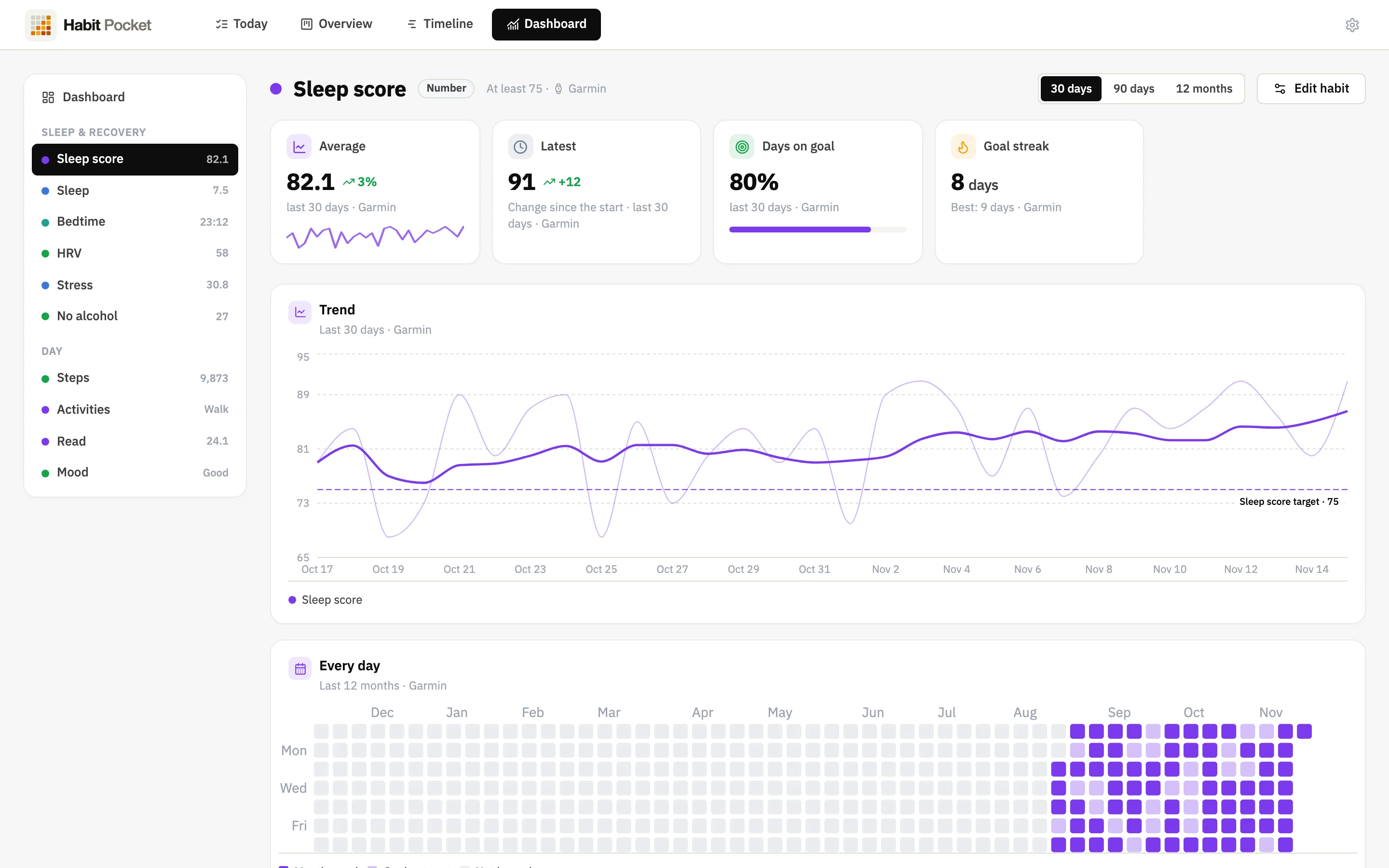
Your watch fills half the grid. You fill the rest.
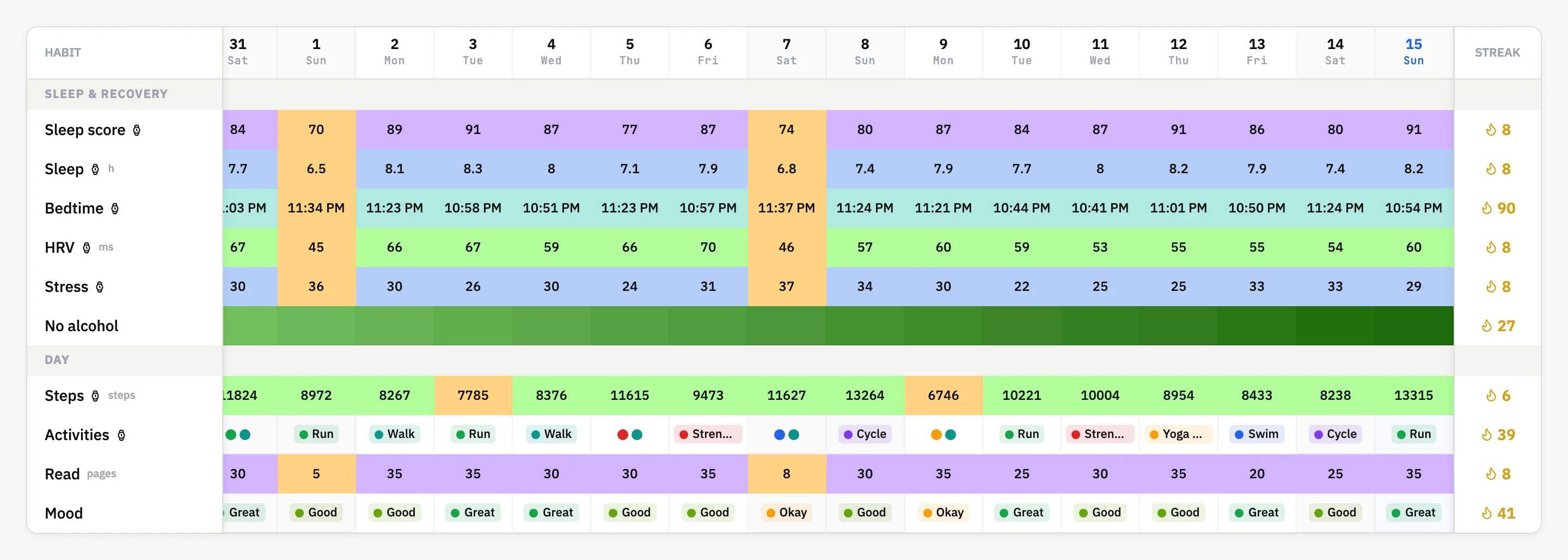
A real screenshot of the web app with demo data. The rows with the Garmin mark filled themselves in after each watch sync, next to habits typed by hand, with the same streaks, goals and charts over all of them.
Set it up
Three steps, about a minute.
Connecting is the only thing you do by hand. After that, the watch does the logging.
01
Connect once
Open Settings → Integrations, on the web or in the iPhone app, and sign in to Garmin. Garmin shows its own consent screen, where you choose what to share.
02
Make a Garmin habit
Create a habit, choose Garmin, and pick a metric. The type and unit are set for you: a number for steps, a time of day for bedtime, a list for activities.
03
Sync the watch
When the watch syncs with Garmin Connect, Garmin sends the new numbers to Habit Pocket and the habit fills in. You do not open anything.
The catalogue
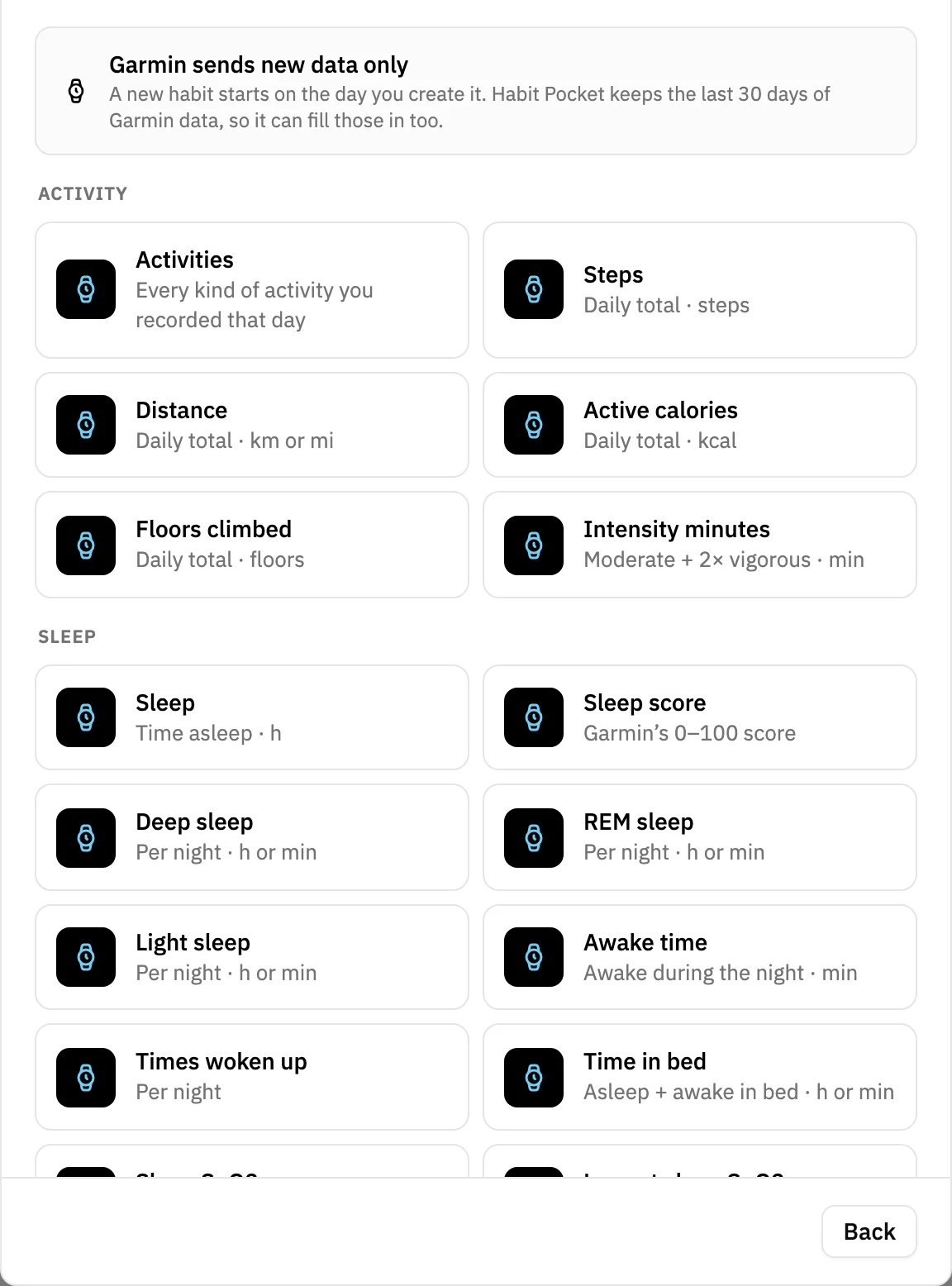
All 24 Garmin metrics you can connect
Grouped the way the picker groups them, with the same one-line description the app shows under each.
Activity
What your day added up to, plus the kinds of activity you recorded.
Activities
Every kind of activity you recorded that day
Stepssteps
Daily total
Distancekm or mi
Daily total
Active calorieskcal
Daily total
Floors climbedfloors
Daily total
Intensity minutesmin
Moderate + 2× vigorous
Sleep
Last night, filed under the morning you woke up, the way Garmin files it.
Sleeph
Time asleep
Sleep score
Garmin’s 0–100 score
Deep sleeph or min
Per night
REM sleeph or min
Per night
Light sleeph or min
Per night
Awake timemin
Awake during the night
Times woken up
Per night
Time in bedh or min
Asleep + awake in bed
Sleep SpO2%
Average while asleep
Lowest sleep SpO2%
Lowest while asleep
Breathing ratebrpm
Average while asleep
Napsmin
Daily total
Bedtime
When you fell asleep, on the date you wake up
Wake-up time
When you woke up
Body
From a Garmin Index scale, or a weight you entered in Garmin Connect.
Weightkg or lb
Last weigh-in of the day
Recovery
The numbers that say how your body is coping.
Resting heart ratebpm
Daily
Stress
Daily average, 0–100
HRVms
Last night average
Activities
One habit for every kind of workout.
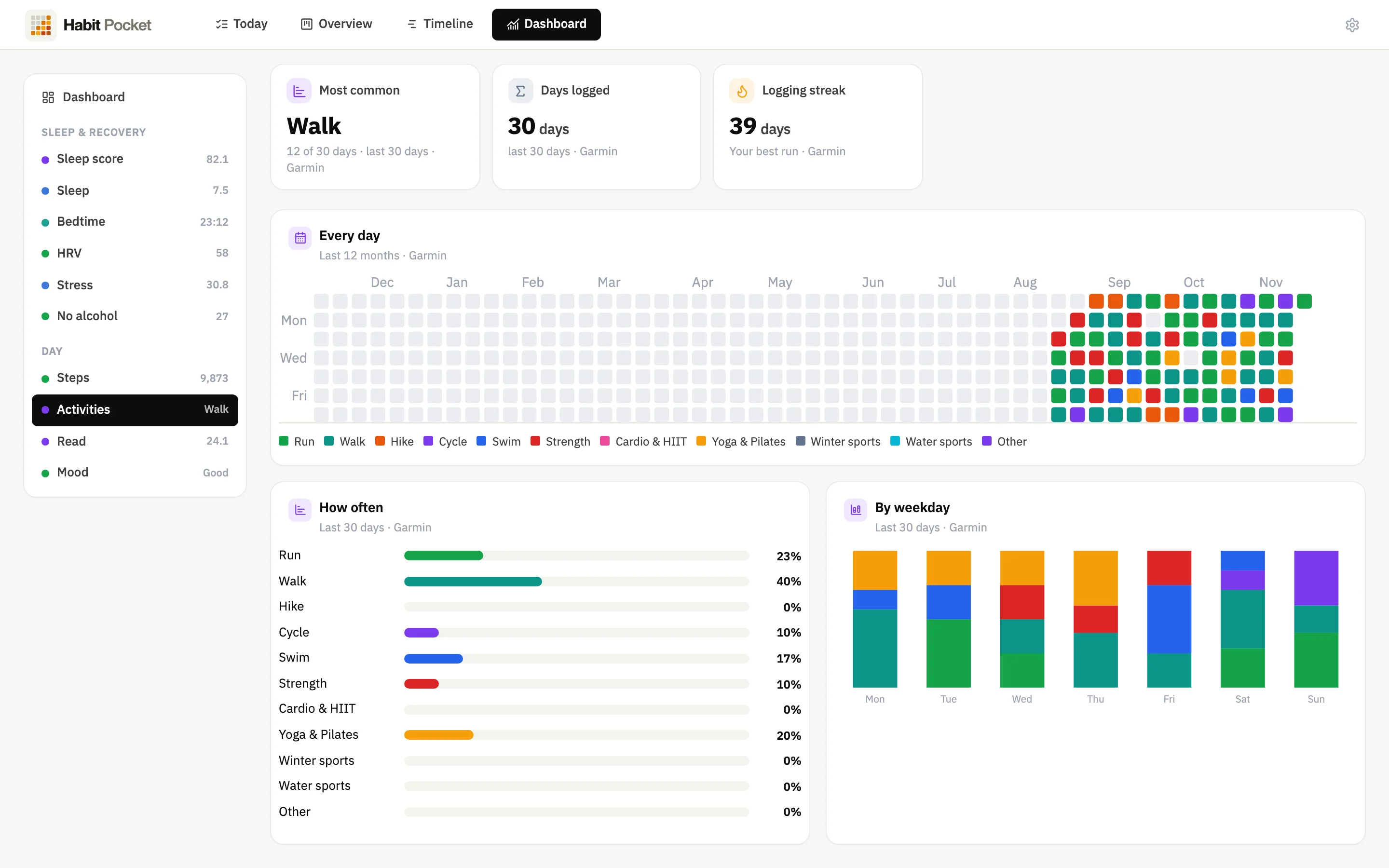
The Activities habit ticks what you recorded that day. A morning swim and an evening walk show as Swim and Walk on the same day, so a month of the grid reads like a training log.
- Run· road, trail, track, treadmill
- Walk· walking, speed walking
- Hike· hiking, rucking, mountaineering
- Cycle· road, mountain, gravel, indoor, e-bike
- Swim· pool, open water
- Strength· strength training
- Cardio & HIIT· HIIT, elliptical, stairs, indoor rowing
- Yoga & Pilates· yoga, Pilates, mobility
- Winter sports· skiing, snowboarding, skating
- Water sports· rowing, kayaking, paddleboarding, surfing
- Other· anything else you record
Rename, recolour or reorder the options as you like. You cannot add or remove them, because Garmin decides which activity types exist; a type Garmin adds later lands in Other. If you connected before activities arrived, Habit Pocket asks you to reconnect once so Garmin can share them.
How it behaves
What Habit Pocket is allowed to do with your Garmin data.
An automatic import is only worth having if its rules are boring and predictable. These four govern every value.
Your edits always win
The connection may only create a missing day or update a value it wrote itself. A number you typed by hand stays, and one tap on that day puts the Garmin value back if you want it.
Nothing goes back to Garmin
Habit Pocket reads what you allow on Garmin’s consent screen and never writes to your Garmin account. Your watch, your Garmin Connect history and your goals there stay as they are.
Never shared, never sent to AI
Garmin data fills your habits and nothing else. It is never sold or shared, and an AI assistant you connect to Habit Pocket does not see it. Of an activity, only its type and start time are kept, never the route.
From the day you connect
Garmin sends new data only, so values start on the day you connect. A habit you add later fills in from that day, up to 30 days back. Disconnect any time; the values already in your habits stay.
Honest limits
What this does not do.
Four things worth knowing before you decide, because finding them out afterwards is worse.
- No history through the connection. Garmin sends new data only, so values start on the day you connect. Your older history comes in as a CSV exported from Garmin Connect, through the free web importer.
- A deleted activity stays ticked. Garmin does not tell apps when you delete an activity, so the Activities habit keeps that day’s tick. Untick it by hand if it matters to you.
- Pro, not free. Connecting Garmin needs Pro, at $3.99 a month, $29.99 a year or $49.99 once. The free plan still covers five habits with numbers, sync and export, entered by hand.
- Garmin only. There is no direct Oura, Whoop or Fitbit connection. On iPhone, Apple Health auto-fill reads anything those devices write to Health.
Why it matters
Garmin knows how you slept. It does not know why.
Garmin Connect is good at your body’s numbers. It has no idea whether you had coffee after 2 pm, read before bed or skipped the evening screen.
Habit Pocket puts both halves in one grid. Your sleep score, HRV and bedtime arrive from the watch, and the habits behind them are one click each. Then any chart can overlay one on the other: sleep score against late caffeine, HRV against the weeks you trained hard, bedtime against the evenings you read. Those comparisons need months of both numbers, and months of typing sleep data by hand is where most people quit.
FAQ
Garmin in Habit Pocket — common questions
Yes, directly. Connect your Garmin account once in Settings → Integrations, on the web or in the iPhone app, and pick which Garmin metric each habit should follow. After your watch syncs with Garmin Connect, Garmin sends the new numbers to Habit Pocket and the matching habits fill in. You do not need Apple Health in between, and it works the same with any Garmin watch or scale that syncs to Garmin Connect.
Twenty-four metrics in four groups. Activity: the kinds of activity you recorded, steps, distance, active calories, floors climbed and intensity minutes. Sleep: time asleep, sleep score, deep, REM and light sleep, awake time, times woken up, time in bed, average and lowest SpO2, breathing rate, naps, bedtime and wake-up time. Body: weight. Recovery: resting heart rate, stress and HRV. Distance and weight can be shown in miles and pounds, and the sleep stages in hours or minutes.
It is a pick-from-a-list habit with eleven fixed options: Run, Walk, Hike, Cycle, Swim, Strength, Cardio & HIIT, Yoga & Pilates, Winter sports, Water sports and Other. Every activity you record on the watch ticks its option for that day, so a morning swim and an evening walk show as Swim and Walk on the same day. You can rename, recolour and reorder the options, but not add or remove them, because Garmin decides which activity types exist. Of each activity, Habit Pocket keeps only its type and start time, never the route.
Not through the connection. The Garmin access that apps like this one get sends new data only, so values start from the day you connect. A habit you create later still fills in from that day, up to 30 days back. For older history, export a CSV from Garmin Connect and use the free importer in the web app; it reads Garmin’s exports as they are, including “9h 7min” sleep lengths and “--” for missing days.
Your value wins and stays. The connection may only create a missing day or update a value it wrote itself, so a number you typed on the phone or on the web is never replaced by a later sync. If you change your mind, the day shows a small marker, and one tap on it puts the Garmin value back.
Yes. Habit Pocket uses Garmin data only to fill the habits you create and show them to you. It is never sold, never used for advertising and never shared, and that includes AI assistants: if you connect Claude or ChatGPT to Habit Pocket, they do not see your Garmin data. Habit Pocket never writes anything to your Garmin account, and you can disconnect in Settings at any time; the values already in your habits stay until you delete them.
Connecting Garmin needs Pro: $3.99 a month, $29.99 a year or $49.99 once for Lifetime. It works on the web and in the iPhone app (version 1.5 or later), and the values sync between them like any other habit. Android has no app yet, but the web app works in any browser.
Five habits. Thirty days.
See what shows up.
No credit card. Pick five habits. Come back in a month.